
A paragraph about how a VPN tunnel works, or which router port the cable goes into, is clearer with a few seconds of motion, but nobody on a small help site has time to animate diagrams or film b-roll for every article. So I spent a morning testing whether a text-to-video model could fill that gap, and what it costs when scripted.
The model was Gemini Omni 1.2 Flash, model ID gemini-omni-1.2-flash. Its documentation lists durations from 3 to 15 seconds, resolutions of 360p, 720p, 1080p and 4K (the last two upscaled), 16:9 or 9:16, audio in every clip, first/last-frame input, and extension of an earlier task. There is also an Ext channel, gemini-omni-1.2-flash-ext, with a flat per-second rate. I confirmed both IDs in the models list before starting, then tested every one of those options at least once: 20 paid requests on 16 November 2026, all logged.
The client code
The API is asynchronous: you submit a job, get a task ID, and poll. In an earlier session on 15 November, every 720p, 1080p and extend request failed with service_unavailable (all refunded), so I wrote the client to retry a limited number of times and then fall back instead of hanging:
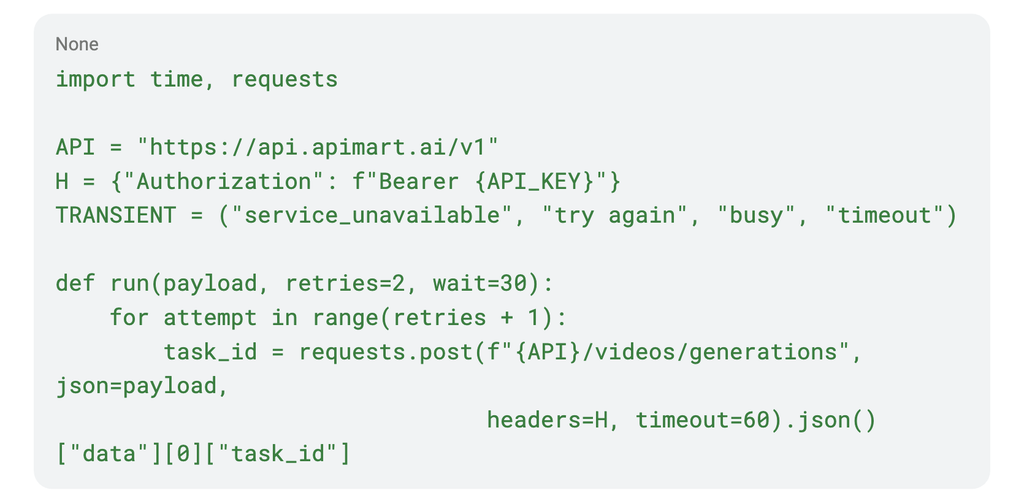
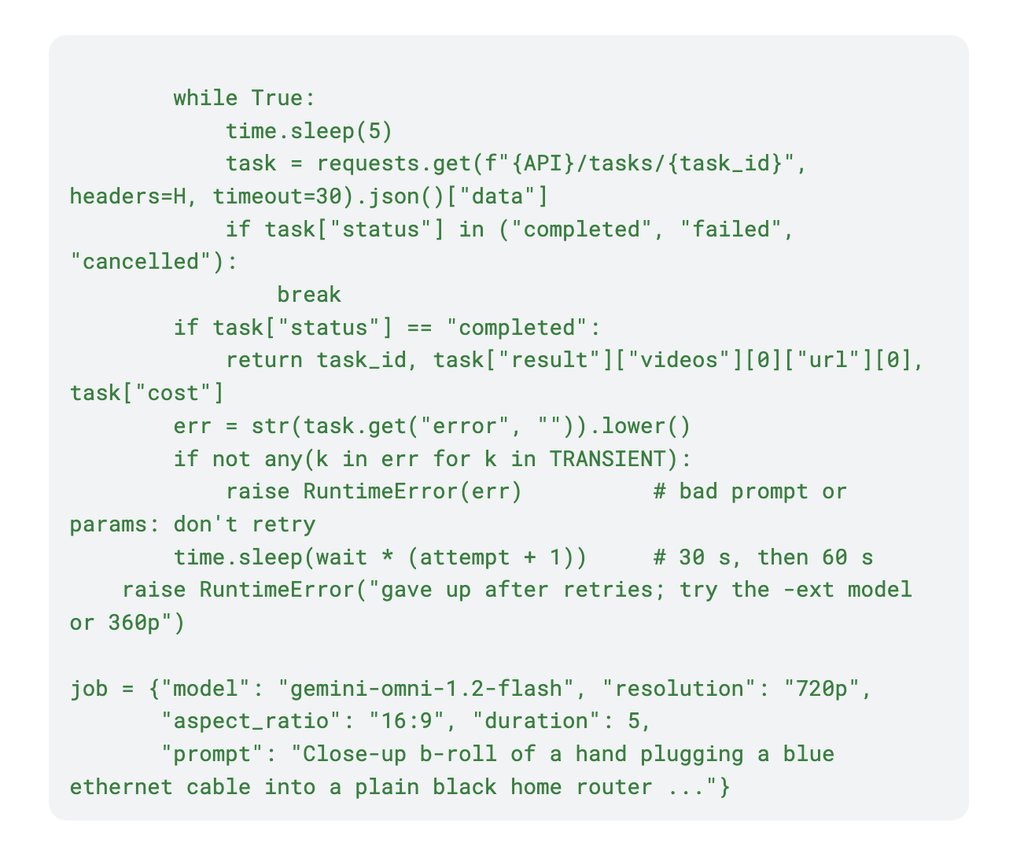
If a tier is down, it usually stays down longer than a publishing script should block, so log the task ID and move on.
Test 1: an animated VPN diagram from text alone
The first prompt described a flat vector diagram: laptop on the left, server on the right, an orange tube labelled “VPN”, green packets getting a padlock as they enter the tube.
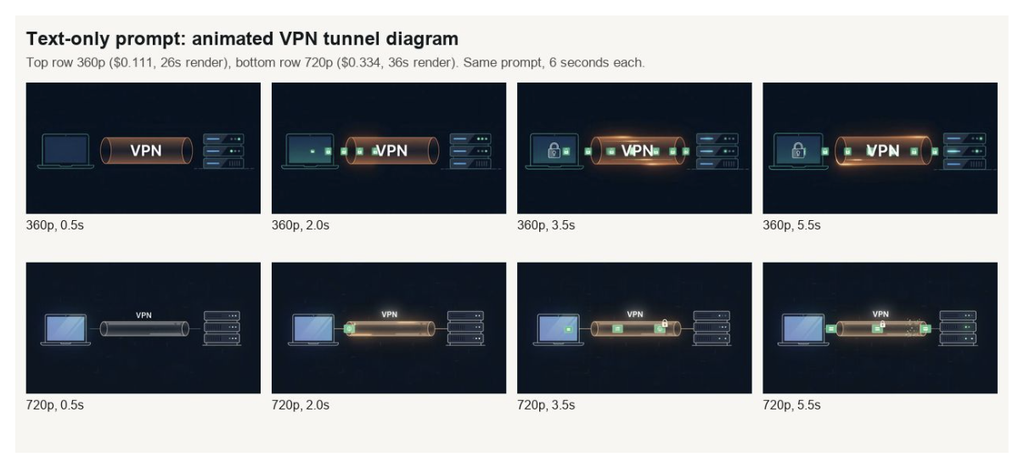
Same prompt at 360p and 720p.
Both versions got the layout right, and the single word “VPN” was spelled correctly in every frame. The details slipped. At 360p the padlock showed up on the laptop screen, not on the packets. At 720p the padlocks went where I asked, but one packet broke into particles near the server at 5.5 seconds. I would not trust it with a diagram that has more than a couple of labels.
Test 2: animating my own diagram with first and last frames
Better idea: draw the diagram myself and let the model handle only the motion. I made two slides, identical except for the position of a “DATA” packet, and sent them as first_frame_image and last_frame_image.
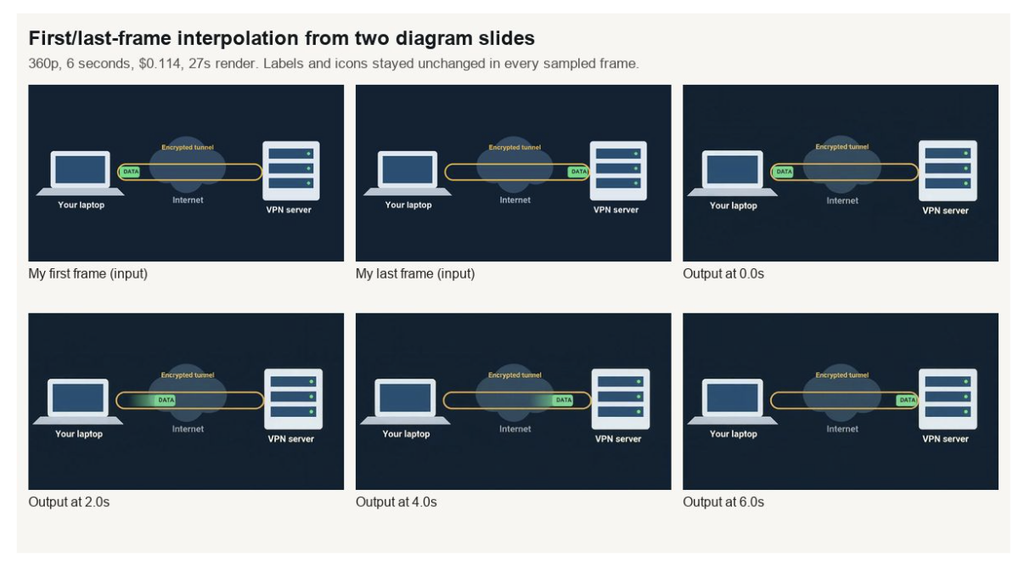
Inputs and four output frames.
This is the result I would actually use. All five labels stayed exactly as I typed them, the packet slid smoothly along the tunnel, and the model added a soft glow trail. The one unrequested change was a faint texture in the flat background. Six seconds at 360p cost $0.114 and rendered in 27 seconds. First/last-frame mode is documented up to 10 seconds.
Test 3: one prompt at every resolution
For b-roll I used a close-up of a hand plugging a blue ethernet cable into a plain black router, then ran it at 360p, 720p, 1080p and 4K, plus 720p on the Ext channel. The Gemini Omni 1.2 Flash API page lists per-second prices for each tier; what I was billed came in slightly under the listed rate.
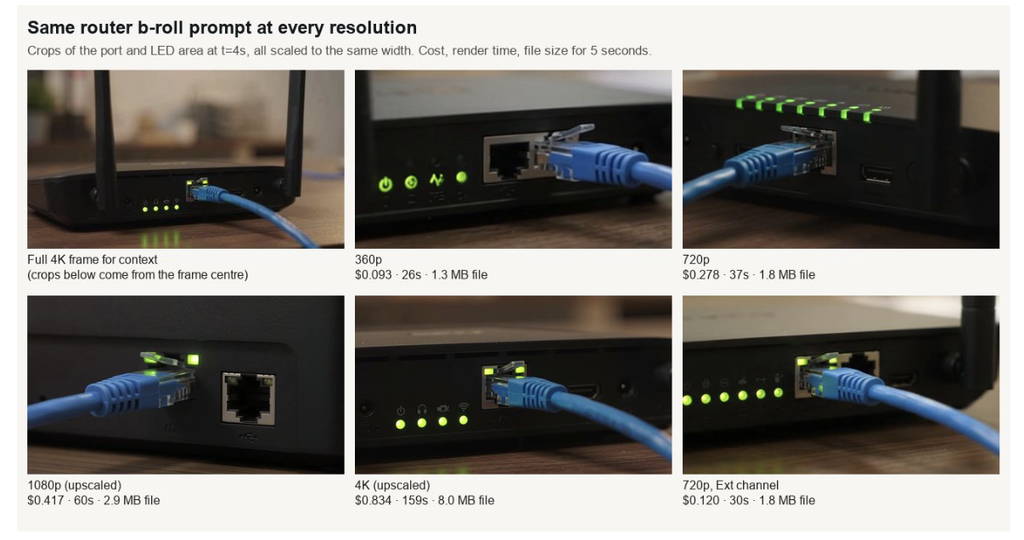
Each crop comes from a separate generation, so framing differs.
Every tier completed on the first try this time. Delivered sizes matched the request exactly: 640×360, 1280×720, 1920×1080 and 3840×2160. Billed cost per second worked out to $0.0186 at 360p, $0.0556 at 720p, $0.0834 at 1080p and $0.167 at 4K. The Ext channel at 720p was $0.024 per second, less than half the main channel’s 720p rate, and I could not see a quality difference in my clips.
1080p and 4K are upscaled, per the docs, and a help page shows the clip in a 700-pixel column anyway. The 4K file was 8 MB for five seconds and took 159 seconds. For fast pages, 720p is the sensible ceiling.
Test 4: what you ask for vs what you get
I checked every downloaded file with ffprobe.
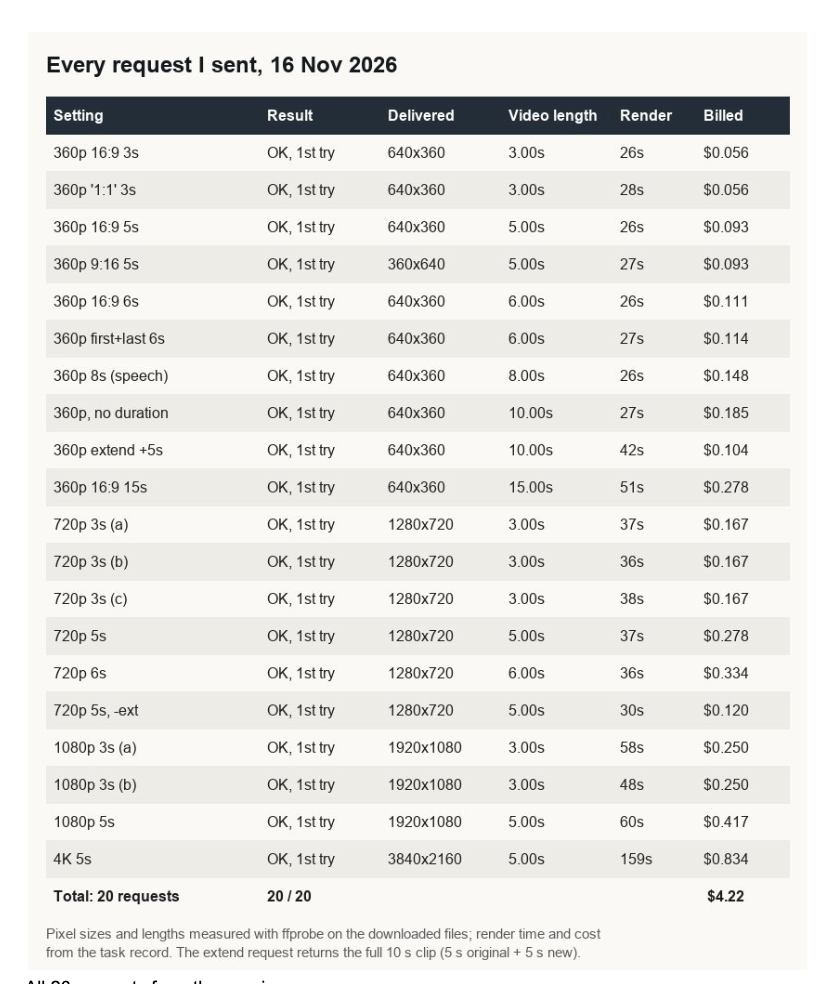
All 20 requests from the session.
Durations were exact to the frame: 3, 5, 6, 8 and 15 seconds at 24 fps, and omitting duration gave the documented default of 10. Audio ran 0.03 to 0.04 seconds past the video in every file. An unsupported 1:1 aspect ratio did not raise an error; it quietly returned 16:9, as the docs say. 9:16 delivered 360×640.
Render time barely tracked length at 360p: 26 to 28 seconds for anything from 3 to 10 seconds of video, 51 seconds for 15. Higher tiers took longer: 36 to 38 seconds at 720p, 48 to 60 at 1080p.
Test 5: a spoken support tip
Audio is part of every clip, so I asked for a technician at a desk saying one sentence: “Restart the router, wait thirty seconds, then check the lights again.”
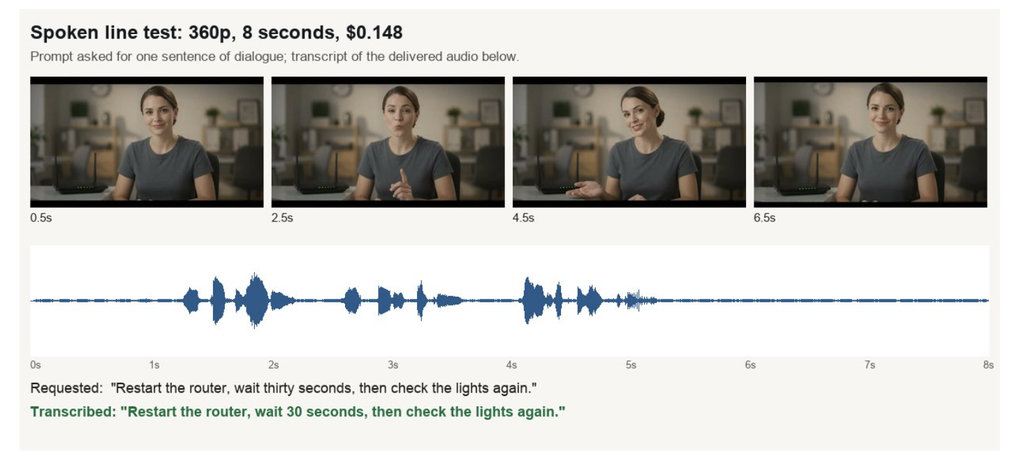
Waveform and transcript of the delivered audio.
A speech-to-text pass returned the sentence word for word. The speech ran from 1.3 to 5.2 seconds of the 8-second clip, so expect to trim nearly three seconds of silence at the end. The person is generated; I would say so in the caption.
Test 6: extending a clip
Finally I extended the 360p router clip by five seconds using extend_from_task_id with omni_reference_task_type set to extend, asking the camera to pull back while the LEDs settle.
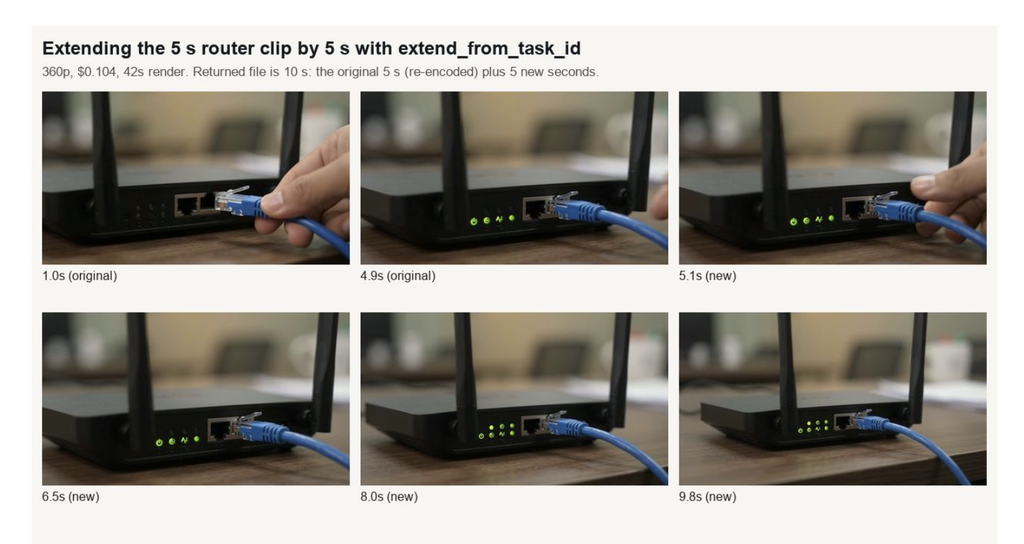
The extension continues the same shot.
It worked: $0.104, 42 seconds, a 10-second file. The join at 5 seconds is hard to spot at normal speed. The new part did not follow the prompt exactly, though: the hand came back for about a second before the pull-back started. That one I would trim before publishing.
Cost and what I would ship
The session came to $4.22 for 107 seconds of finished video, with no failures and no retries needed. All 20 clips were usable as delivered or after a trim. Given the day before, keep the retry logic anyway.
My workflow for the help site:
- Draw diagrams yourself and animate them with first/last frames. It is the only way to keep labels exactly right.
- Draft b-roll at 360p for under ten cents a clip, then rerun only the keeper at 720p, on the Ext channel if its rate holds.
- Skip 1080p and 4K for web pages. They cost more, take longer and add page weight.
- Trim the silent tail of speech clips, check every clip for invented text, and label generated presenters.
- Cap retries at two, then fall back to a lower tier or the Ext channel.